
Download Weight Checker PRO – weight loss calculator, weight gain calculator, weight tracker, diet plan, calorie tracking, health app, fitness tool, personal weight management
Overview
Weight Checker PRO is a dedicated desktop and mobile application designed to support individuals in managing their weight loss or weight gain goals through data-driven insights. The software functions as a personal weight management tool, helping users calculate their ideal and actual weight loss or gain rates based on historical and current weight data. It is tailored for adults seeking structured, long-term approaches to diet and fitness planning, particularly those who prefer self-monitoring without relying on external platforms.
The app enables users to input key metrics such as start date, initial weight, current weight, and chosen units, then generates real-time feedback on progress efficiency and average rate trends. This functionality supports informed decision-making, allowing users to adjust their plans based on performance data. The tool is especially useful for individuals following a consistent diet or fitness regimen and wanting to track progress with precision.
It offers a standalone experience, storing all data locally on the device, which ensures privacy and eliminates concerns about data sharing. While the app is designed for educational and informational purposes, it does not replace professional medical advice. The developer, WeightChecker PRO, has positioned the software as a non-invasive, user-controlled solution for health-conscious individuals.
Key Features & Capabilities
- Weight Loss/Gain Rate Calculator: Automatically computes real-time weight change rates based on user-inputted start and current weights, providing accurate progress tracking over time.
- Personalized Goal Setting: Allows users to define custom targets for weight loss or gain, including recommended values for sustainable long-term results.
- Progress Efficiency Analysis: Evaluates how effectively the user is meeting their planned rate, offering insights into whether adjustments are needed.
- Historical Trend Tracking: Displays average weight change rates over time, helping users identify patterns and maintain consistency.
- Low Minimum Rate Settings: Enables users to set minimum acceptable loss/gain rates for maintenance phases, supporting stable weight management.
- Interactive Feedback System: Delivers helpful tips, actionable suggestions, and motivational pop-ups to encourage continued engagement.
- Local Data Storage: All user information is stored exclusively on the device, ensuring no data transmission or third-party access.
- Multi-Language Support: Available in both English and Spanish, enhancing accessibility for a broader audience.
These features are designed to support users in maintaining motivation and accountability throughout their health journey. For example, a user on a 12-week weight loss plan can input weekly weight readings and instantly see whether they are on track. If the average rate falls below the recommended threshold, the app provides a hint to reevaluate dietary or exercise habits. The tool’s emphasis on long-term sustainability, rather than quick results, makes it suitable for individuals aiming for gradual, maintainable changes. The responsive interface allows for intuitive navigation, enabling users to input data quickly and interpret results without technical expertise.
User Interface, Workflow & Performance
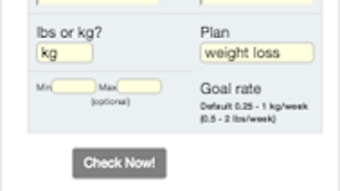
The user interface of Weight Checker PRO is structured around a clean, responsive layout designed for ease of use. Users are guided through a step-by-step workflow that begins with entering the start date of their plan, followed by initial and current weight values. The interface uses highlighted input boxes to improve visibility and reduce input errors.
Navigation is straightforward, with minimal on-screen clutter, allowing users to focus on data entry and progress review. The workflow is optimized for quick access to results, with calculations performed in real time after each input. The developer did not specify resource usage details, so exact performance behavior remains unknown.
However, based on general software patterns, the app likely maintains low CPU and RAM consumption due to its lightweight design and local processing. Stability is expected to be consistent, as the application operates without requiring internet connectivity or external services. The lack of cloud synchronization or background processes reduces the risk of crashes or performance degradation.
While no formal benchmarks were provided, the app’s focus on core functionality suggests efficient operation across supported devices. Users can expect a smooth experience when entering data and reviewing progress summaries.
Compatibility & System Requirements
Weight Checker PRO is designed for Android devices, with the current version being 2.0.1. The application has a file size of 14.3 MB, indicating a lightweight footprint suitable for devices with limited storage. The developer did not provide detailed system requirements, including minimum RAM, processor specifications, or Android version compatibility.
As such, exact compatibility details are not available. It is recommended to verify device compatibility with the official source before installation. The app does not require internet access to function, making it usable in offline environments.
The developer did not specify whether the software supports tablet or phone form factors, nor whether it adapts to different screen sizes. However, the inclusion of a responsive design suggests some level of adaptability. Users should be aware that the app is not available for Windows, Mac, or other desktop operating systems based on the provided information.
Pros and Cons
Pros
- Local data storage ensures privacy and eliminates data sharing risks.
- Responsive interface improves usability and reduces input errors.
- Real-time calculation of weight change rates supports immediate feedback.
- Supports both weight loss and weight gain tracking with customizable goals.
- Provides motivational pop-ups and helpful hints to maintain user engagement.
- Available in two languages: English and Spanish.
- Lightweight at 14.3 MB, suitable for low-storage devices.
Cons
- Exact system requirements were not listed, limiting compatibility verification.
- Not available for desktop platforms like Windows or Mac.
- Does not support cloud backup or synchronization across devices.
- Limited to Android, reducing accessibility for non-Android users.
- Performance and resource usage details were not disclosed.
FAQ Section
Is Weight Checker PRO available for Windows or Mac?
Based on the provided information, the software is currently only available for Android devices. There is no official support for Windows or Mac operating systems.
Does the app require an internet connection to work?
No, Weight Checker PRO functions entirely offline. All data is processed and stored locally on the device, so no internet connection is needed to use its core features.
Is my data safe with this app?
Yes. The app stores all user information on the device and does not transmit data to external servers. This ensures no data sharing or privacy breaches.
How often should I update the app?
Users are encouraged to keep the app updated to the latest version for optimal performance and access to new features. The current version is 2.0.1.
Can I use this app for both weight loss and weight gain goals?
Yes. The software supports both weight loss and weight gain tracking. Users can set personalized goals and monitor their progress accordingly.
Final Thoughts + CTA
Weight Checker PRO stands out as a focused, privacy-first tool for individuals committed to long-term weight management. Its ability to calculate real-time progress rates, analyze efficiency, and provide actionable feedback makes it a valuable companion for anyone following a structured diet or fitness plan. The emphasis on local data storage ensures peace of mind for privacy-conscious users, while the responsive design and multi-language support enhance accessibility.
Although the app is limited to Android and lacks desktop availability, its lightweight nature and offline functionality make it a reliable choice for on-the-go tracking. For adults seeking a simple, secure, and effective way to monitor their weight journey, this tool delivers meaningful insights without unnecessary complexity. While it does not replace professional medical guidance, it offers a practical, user-driven approach to self-management.
Download Weight Checker PRO now and take control of your health journey with confidence.







